



Data exchange for heterogeneous engineering tools
Bring heterogeneous data together, break down data silos, build one continuous toolchain
taraXchange connects heterogeneous engineering tools and brings together data with different formats, naming conventions, and structures — whether it comes from different disciplines, different sites, a company acquisition, or your path toward a digital twin.
Create data mappings with a no-code application — after a short onboarding, you can build them yourself, or let tarakos build the mappings for you.
Three starting points — recognize yours?
01
Data silos across departments and locations
Planning, maintenance, control engineering — every department can end up with its own data, and many disciplines use their own naming and ID systems for the exact same stations, components, or systems. Digital data exchange between them is often simply not possible.
02
Digital product documentation — supplier data vs. OEM requirements
Whether it’s PDF, Excel, Word, XML, or JSON — from a supplier’s perspective, every manufacturer wants the data delivered differently; from a manufacturer’s perspective, every supplier describes it differently. Both sides face the same problem: converting external data so it can be used internally — or preparing your own internal data flexibly enough to meet different customer requirements.
03
Digital twin — before visualization, you need a solid data foundation
To build a holistic data model out of different tools and application areas, or to be able to deliver structured digital product descriptions in the future, data from multiple sources has to be brought together first — before you can even start working on a digital twin, a Digital Product Passport, or an Asset Administration Shell.
taraXchange doesn’t just translate file formats…
… it carries over meaning. Instead of converting “format A to format B,” taraXchange maps the semantic relationships between data structures: which field in system A corresponds to which field in system B, how units are converted, how missing values are pre-filled, how attributes can be extracted from free text (for example, from object names). The result is a reusable, extensible mapping rule — not a one-off conversion.
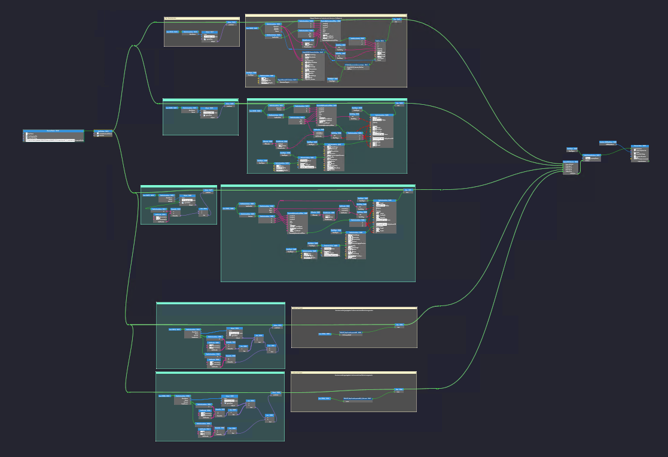
The taraXchange modules at a glance
| taraXchange-Modul | What it does | Where it’s used |
|---|---|---|
| taraXchange-Editor | A no-code interface for creating mapping rules between any data structures, even very different ones — including object hierarchies, string operations, numeric comparisons, logical operators, and reusable custom building blocks. | For creating or adjusting mapping rules — can be done by the customer after training, or delivered as a tarakos service. |
| taraXchange-Runtime | Executes finished mapping rules at runtime — via a plugin in existing software or via command-line call. | Transforms data live, within your running toolchain. |
| SourceData-Reader / TargetData-Writer | Reads or writes data from/to a format, or directly from/to software with a corresponding API. | The start or end point of the data transformation. |
| taraXchange-Runtime SDK | Embeds the runtime directly into .NET toolchain applications — with around 20 lines of code. | When you need direct integration instead of a command-line call. |
Finished mapping rules are protected
Every mapping rule is delivered as a “Compiled Mapping Rule” (CMR) — compiled, encrypted, and cryptographically signed. Neither the underlying logic nor the source systems can be traced back from it. That protects your intellectual property whenever a mapping has to be shared with a third party, and protects your customers’ data when you build a mapping on their behalf.
How taraXchange-editor works in practice
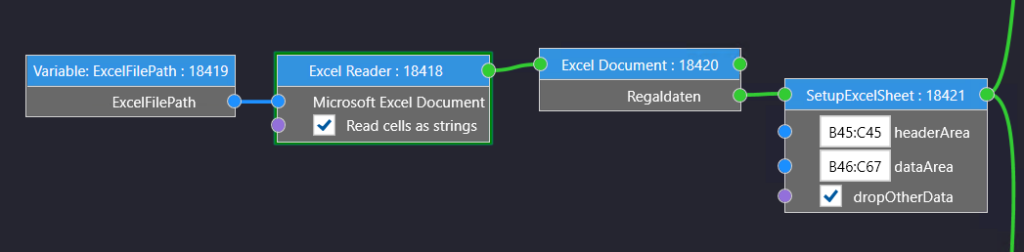
You create and maintain mapping rules yourself, with no software development involved — changes to a data structure, a format, or a naming convention are made in the graphical interface, not in code.
Results you get with taraXchange
Ein durchgängiger, wiederverwendbarer Datenaustausch statt Einzellösungen pro Toolpaar — planbarer Integrationsaufwand, geschützte Mappinglogik bei Weitergabe an Dritte, und Unabhängigkeit von den Datenstandards einzelner Konzerne oder Lieferanten.
taraXchange vs. writing your own scripts
A custom script usually solves only the one format conversion it was written for; if the source, target, or structure changes, the code has to be adjusted and re-tested. taraXchange represents mapping rules in a structured, graphical interface — including 1:1 and n:m relationships — and delivers them as standalone, protected building blocks instead of linear, openly readable code.
Where taraXchange is used
- Building a digital twin: bringing together data from MCAD, ECAD, control engineering, and maintenance into one shared data model.
- Automated 3D model generation for taraVRbuilder: automatically converting layout data from AutoCAD, ArchiCAD, or CARF into a taraVRbuilder 3D model — a taraXchange runtime component is unlocked in taraVRbuilder for this purpose.
- Integrating companies after an acquisition: bringing the data structures of newly acquired companies into your own system landscape, without manually reworking every system.
- Providing structured product data for customers or corporate procurement: converting data from multiple sources into a required target format — for example, toward AutomationML, the Asset Administration Shell (IDTA), or company-specific requirements.
References
tarakos was a consortium partner in the DIAMOND research project (2022–2025), where taraXchange was further developed for automotive-sector use cases — digital twins, planning of automated production facilities, and data migration. As part of the project, taraXchange was extended with a data backbone: it converts acquired data from different disciplines — such as MCAD, ECAD, control engineering, maintenance, or purchasing — into a neutral data format, then makes it available again based on discipline and perspective. This is useful both for plant builders and for plant operators.
Beyond that, there have been further commercial taraXchange projects in the automotive space.
AutoCAD interface in action: This YouTube video shows the finished interface between AutoCAD and taraVRbuilder in practical use: both tools are open side by side, and every object for which mapping rules were created beforehand is transferred automatically. If information is missing from the 2D layout — height data, for example — it can be added manually. Material flow behavior is then configured directly at the intersection modules using right-of-way and distribution rules.
Frequently asked questions
What exactly is taraXchange?
taraXchange is a no-code software suite for creating mapping rules between heterogeneous data structures graphically and executing them at runtime — for data exchange between engineering tools from different vendors and disciplines.
Do I need to know how to program to use taraXchange?
No. The taraXchange Editor is a no-code application — mapping rules are built through a graphical interface. For deeper integration of the runtime into your own .NET applications, an SDK is also available, but that’s only relevant for developers who want to go beyond a simple command-line call.
Which formats and systems does taraXchange support?
Readers/writers already available cover, among others, AutoCAD, ArchiCAD, taraVRbuilder, AutomationML/AMLX, Excel, JSON, XML, SQL databases, web APIs, SAP AIN, and the IDTA Asset Administration Shell. For systems with their own API, additional readers/writers can be developed as a service.
Is taraXchange only relevant for taraVRbuilder customers?
No. taraXchange is a standalone product for data exchange between any engineering tools. Automated 3D model generation for taraVRbuilder is just one use case among several.
Do I have to get mapping rules from tarakos, or can I create them myself?
Both are possible. You can license taraXchange yourself and create mappings independently once your team has been trained on the Editor. Alternatively, tarakos also offers mapping creation and the development of additional readers/writers as a service.
How long does it take to get up to speed with the taraXchange Editor?
Typically 3–5 days, depending on the complexity of the data structures involved. After that, you create and maintain mapping rules independently, without needing to involve tarakos.
Let’s talk about your project in a short online call — we’ll tell you honestly whether taraXchange is the right fit, and show it to you directly, applied to your use case.