




3D facility planning for the concept phase
Fast to learn, ready to use — 3D software for concept planning and sales
taraVRbuilder builds your facility model from extensive, parameterizable libraries, brings it to life as a video, in the free taraVRviewer, or as a rendered image, and delivers your first reliable figures — no CAD, programming, or PLC/control-technology know-how required.
In a short online call, we’ll clarify your goal and use case — then tell you honestly whether taraVRbuilder is the right fit. If you’d like to try it yourself afterward, you’ll get a short walkthrough focused on your specific use case.
taraVRbuilder is used differently depending on your industry — find your use case..
Conveyor Technology Manufacturers & System Integrators
Win more bids — 3D facility models and equipment lists straight from sales
Logistics Providers & Freight Forwarders
Plan warehouses in 3D — with ready-made libraries for building elements, racking, and vehicles
Automation & Mechanical Engineering
Make cycle times and processes visible, not just geometry
Universities & Vocational Training
Get students ready to put their planning project into 3D within hours

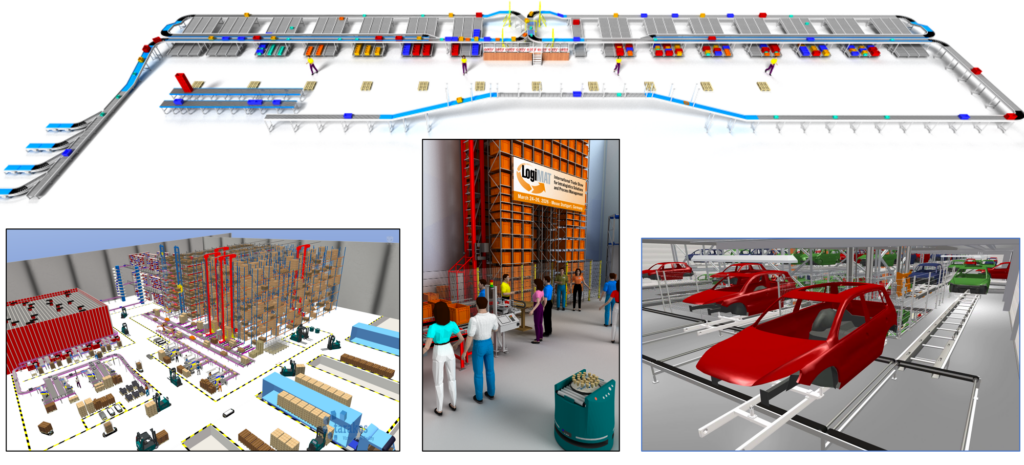
Reference examples: multi-level conveyor system / logistics warehouse / order-picking facility
One piece of software, three goals in the concept phase
01
Build a 3D facility model
Using extensive, manufacturer-neutral, parameterizable model libraries. CAD models can also be imported and linked to ready-made behavior models.
02
Visualize the facility model dynamically
As a video flyover, walkable in the free taraVRviewer, or as rendered images — whatever fits your sales pitch or presentation.
03
Determine preliminary facility figures
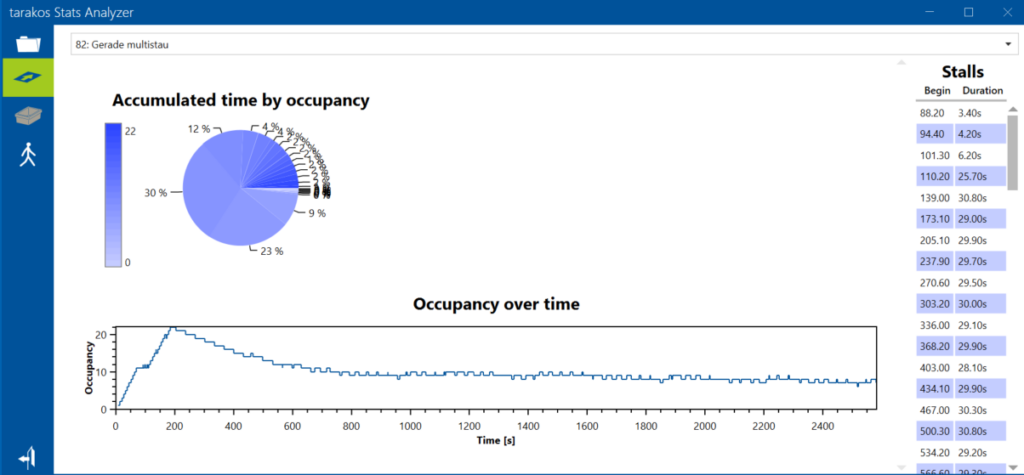
With the StatsAnalyzer add-on: throughput, utilization, capacities, limited cycle/dwell times. It doesn’t replace a full material flow simulation — it delivers preliminary validation for the concept phase.
Two perspectives
Get started without waiting
You work independently, without waiting on CAD specialists or programmers — an affinity for computers and a willingness to learn is all it takes. Start right away with extensive model libraries..
Decide with a convincing facility model
A shorter path from idea to a convincing facility model for sales and planning, project data you can reuse in later engineering steps instead of recreating from scratch — and, if needed, an early preliminary validation of throughput and utilization.
taraVRbuilder – 3D visualisation and simulation software for the layout of intralogistics systems
What taraVRbuilder brings to the table
One piece of software covers three goals of the concept phase — building a 3D facility model, visualizing it, and determining preliminary figures — with no CAD, programming, or PLC/control-technology knowledge required. The following six sections show in detail how this works.
1. Start immediately with ready-made library objects — the foundation for efficient model building
- Extensive ready-made library objects let you start right away, without building your own models from scratch.
- Drag-and-drop: Objects are dragged straight from the library into the layout.
- Connection-point logic: Objects “know” where they can dock — reducing errors when chaining track sections together.
- 3D mover with snapping: Objects can be moved freely in 3D space and snap automatically to matching points and positions.
2. Library object overview
araVRbuilder comes with parameterizable, manufacturer-neutral model libraries for all common intralogistics and facility components — including buildings.
- Conveyor technology (floor-level): Roller conveyors, belt conveyors, turntables, transfer cars
- Overhead conveyors: Overhead conveyors, monorail, power & free
- Vehicles: Forklifts, reach trucks, AGVs, AMRs
- Lifting equipment: Cranes, area and linear gantries
- Racking & storage: Pallet racking, container racking, compact storage, storage and retrieval machines (S/R machines), block storage, coil storage
- Building elements: Walls, pillars, gates
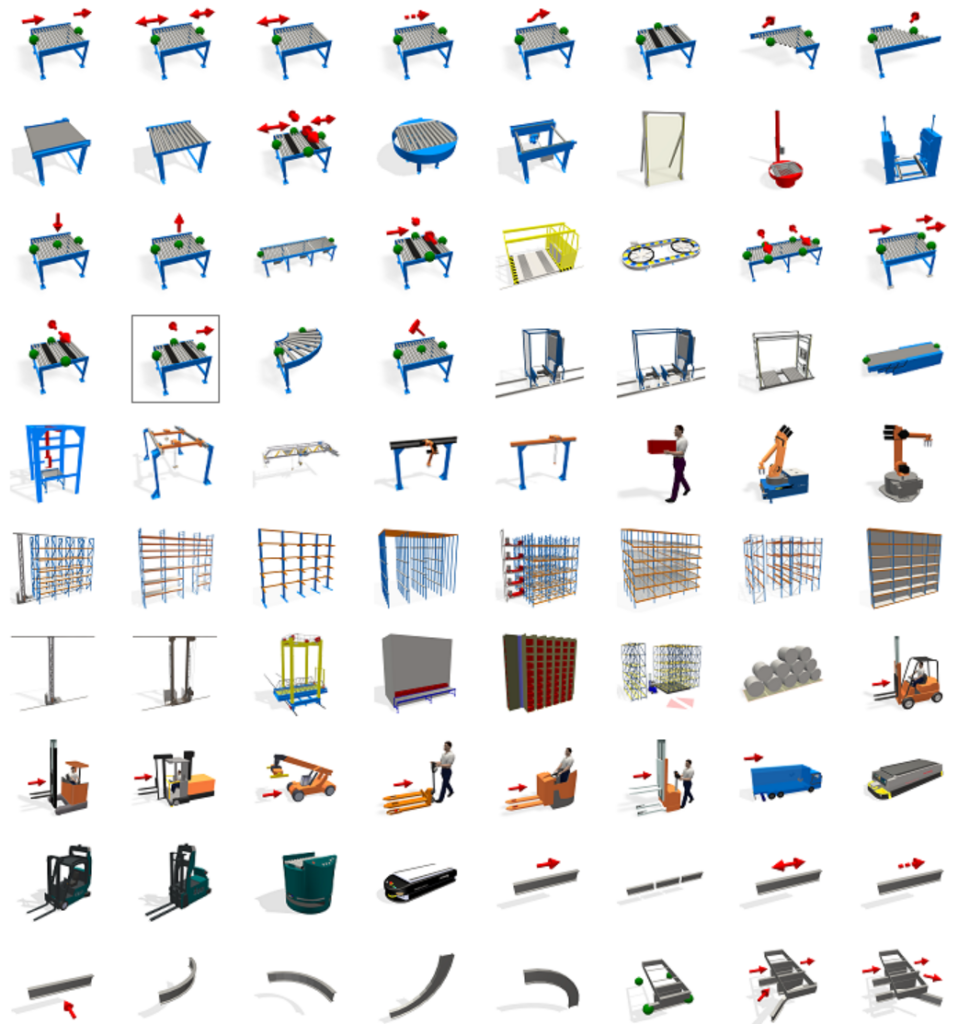
The library objects can be parameterized in their dimensions, colors, and behavior (conveying speeds, number of accumulation positions, etc.). CAD models can also be imported and linked to ready-made behavior models.
3. Assistant functions — faster model creation and parameterization
taraVRbuilder offers several assistant functions that speed up model creation and parameterization considerably compared with placing individual objects manually.
- Arrangement grid: Objects can be placed grid-aligned — for clean, consistent layouts without aligning individual elements by hand.
- Automatic filling of system lines/polylines: A drawn line is automatically filled with a chain of preconfigured objects — for example, alternating safety fence panels and posts, conveyor sections, or monorail tracks — taking into account preferred lengths as well as minimum and maximum length limits of the individual segments.
- Transfer properties: Object properties configured once can be transferred to other objects of the same type, instead of parameterizing each one individually.
- Project libraries: Sections of a project — such as a fully configured facility cell — can be saved as a reusable project library and used again in other projects.
4. Interfaces and data formats
taraVRbuilder imports 2D layouts, building data, and 3D machines — both stationary facility parts and movable objects such as vehicles or crane components — and connects to AutoCAD via two different interfaces.
- Import of 2D layouts, building floor plans, and BIM data: Building data as IFC; AutoCAD layouts as DXF (see geometry interface below).
- Import of 3D machines and components (STEP, JT, FBX, OBJ): both stationary (e.g., fixed facility parts) and movable — such as vehicles or moving parts like transfer cars, storage and retrieval machines, or crane components. Movable imports can then be linked to a behavior model (examples: cross-transfer car, lifter, AGV, AMR, S/R machine, crane).
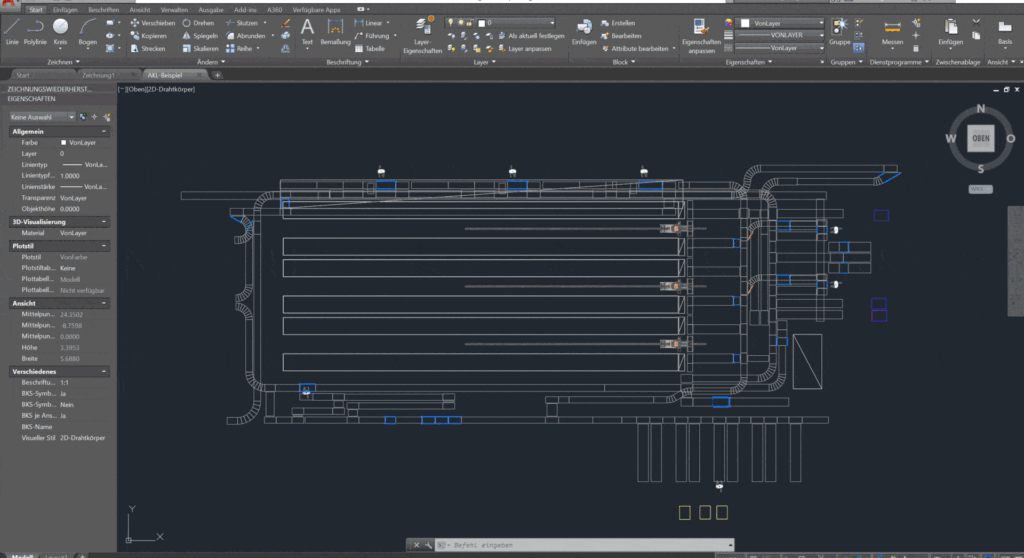
- AutoCAD — geometry interface: DXF layout import; taraVRbuilder models are then placed manually.
- AutoCAD — semantic interface: automated 3D model generation from AutoCAD data (paid add-on option in combination with the taraXchange (link to EN taraXchange page, URL still open) runtime).
- Further connections: Facility layouts based on Excel tables with object positions and configurations; interface to ArchiCAD.
5. Results and output
From a taraVRbuilder project, you can export video, 3D model, rendered images, equipment list, and the complete engineering project data.
- Video export: The animated 3D facility animation/simulation can be exported as a video and flyover — for example, for proposal documents, customer presentations, or your own website.
- Presentation in the free taraVRviewer: The facility model can be handed over to customers without a taraVRbuilder license — interactive instead of just a video.
- 3D model export: Alternatively as rendered images, depending on what fits the respective proposal or presentation situation.
- Equipment list (export): For each project, an equipment list of all installed components (roller conveyors, belt conveyors, turntables, etc.) can be output and exported — a direct calculation basis for the proposal, with no separate compilation.
- Engineering data export: All instantiated objects of a project including their parameters (dimensions, speeds, positions) and their predecessor/successor relationships — for subsequent engineering steps such as electrical planning, detailed engineering, or PLC/control technology.
6. Analysis function and StatsAnalyzer
The separate StatsAnalyzer add-on tool delivers a first rough facility validation, without the effort of a full material flow simulation:
- Throughput at user-defined measuring points
- Utilization of workers and processing stations
- Capacity utilization of conveyor sections
- Limited determination of throughput and dwell times of individual conveyed goods
Benefit in the concept phase: planners can quickly test and compare different system or subsystem variants in the layout — operable by sales engineers too, not just by simulation experts.
- CAD layout already available (optional) → Import via the interfaces (2D layout, building floor plan/BIM, or 3D machine data).
- Start planning with taraVRbuilder → Place objects via drag-and-drop, use connection-point logic and 3D mover/snapping, and fill system lines with the assistant functions.
- Refine and parameterize the model → Transfer properties instead of reconfiguring objects one by one; save a facility section as a project library for follow-up projects if needed.
- Visualize and present → As a video, in the free taraVRviewer, or as a rendered image, depending on the occasion.
- Optional: preliminary validation with StatsAnalyzer → Check throughput and utilization before finalizing the concept.
- Export and share results → Equipment list for calculation, engineering data for downstream steps such as electrical planning or PLC/control technology.

Build an animated 3D layout of a pallet conveyor system via drag-and-drop.
Frequently asked questions
How exactly does taraVRbuilder support the concept phase?
One piece of software, three goals: build an animated 3D facility model from parameterizable libraries; visualize the facility and its dynamic processes via video export or the free taraVRviewer; create rendered images for presentations; and determine preliminary facility figures like throughput or utilization.
What prior knowledge do I need to work with taraVRbuilder?
An affinity for computers and a willingness to learn new things — that’s all you need. No experience with CAD applications, programming, or PLC/control technology is required. Depending on your goal, getting up to speed takes 1–3 days.
How is taraVRbuilder different from modeling tools like SketchUp, Blender, or 3ds Max?
SketchUp is a generic modeling tool, not built specifically for intralogistics, and offers no animation or simulation. Blender, 3ds Max, Cinema 4D, and Maya come without libraries and require manual model and animation work — useful for marketing videos, but too time-consuming for concept visualization. taraVRbuilder also delivers structured project data for later engineering steps, not just images.
Which CAD and data formats does taraVRbuilder support?
The main import formats for CAD data are STEP, JT, FBX, and OBJ; for building data, IFC. AutoCAD layouts can also be imported as DXF, or — via a paid add-on option combined with taraXchange — converted automatically into a 3D model.
What does the AutoCAD import for automatic model generation look like in practice?
Both tools run side by side: any objects for which mapping rules were previously created in taraXchange are transferred automatically from AutoCAD to taraVRbuilder. If information is missing from the 2D layout — height data, for example — you can add it manually in the 3D model. Material flow behavior is then configured directly at the intersection modules using right-of-way and distribution rules. This YouTube video shows the interface in action.
Can I reuse project data for later engineering steps?
Yes. Beyond visualization, taraVRbuilder provides all project data — topography, the technical configuration of every object including dimensions, speeds, positions, and predecessor/successor relationships — through interfaces for electrical planning, detailed engineering, or PLC/control technology.
Let’s talk about your project in a short online call — we’ll tell you honestly whether taraVRbuilder is the right fit, and show it applied directly to your use case.